


Last Updated: November 8, 2026
Quick Summary
An electric desk frame with memory controller is worth it if you change height often, because presets return the desk to the same sitting and standing positions with one touch. Look for several stored heights, a clear height display and a controller within easy reach.
- Setup takes a minute: raise the desk, then hold a numbered button until the controller confirms the position is stored.
- The four memory buttons can store seated, standing and other heights for different tasks or colleagues.
- A controller mounted too far back means leaning under the desktop to change height, defeating the ergonomic point.
- Check the lifting capacity per motor, the travel speed in millimetres per second and the noise rating in decibels.
- The 4 Button Standing Desk Memory Control is free with all electric desks from Ergo Desks.
Table of Contents
- What an electric desk frame with memory controller actually does
- Standing desk frame with memory presets: what to look for
- Electric desk frame dual motor vs single motor
- Desk frame weight capacity and stability at standing height
- Frame-only buying: checking desktop compatibility
- Electric desk frame assembly and everyday safety
- Choosing your electric desk frame from Ergo Desks
- Frequently Asked Questions
What an electric desk frame with memory controller actually does
An electric desk frame with memory controller is the motorised base of a sit-stand desk, paired with a control panel that stores your preferred sitting and standing heights so you can move between them with one touch. This guide from Ergo Desks explains what that combination changes in daily use, what to check before buying, and where cheaper frames fall short.
The memory function is the part people underestimate. Without it, every height change means holding a button and judging the position by eye. With presets, the desk returns to the same position each time, which is useful when you share a desk or switch between sitting and standing several times a day.
How the memory controller works day to day
Setup takes a minute: raise or lower the desk to a comfortable height, then hold a numbered button until the controller confirms the position is stored. From then on, one press sends the frame to that height.
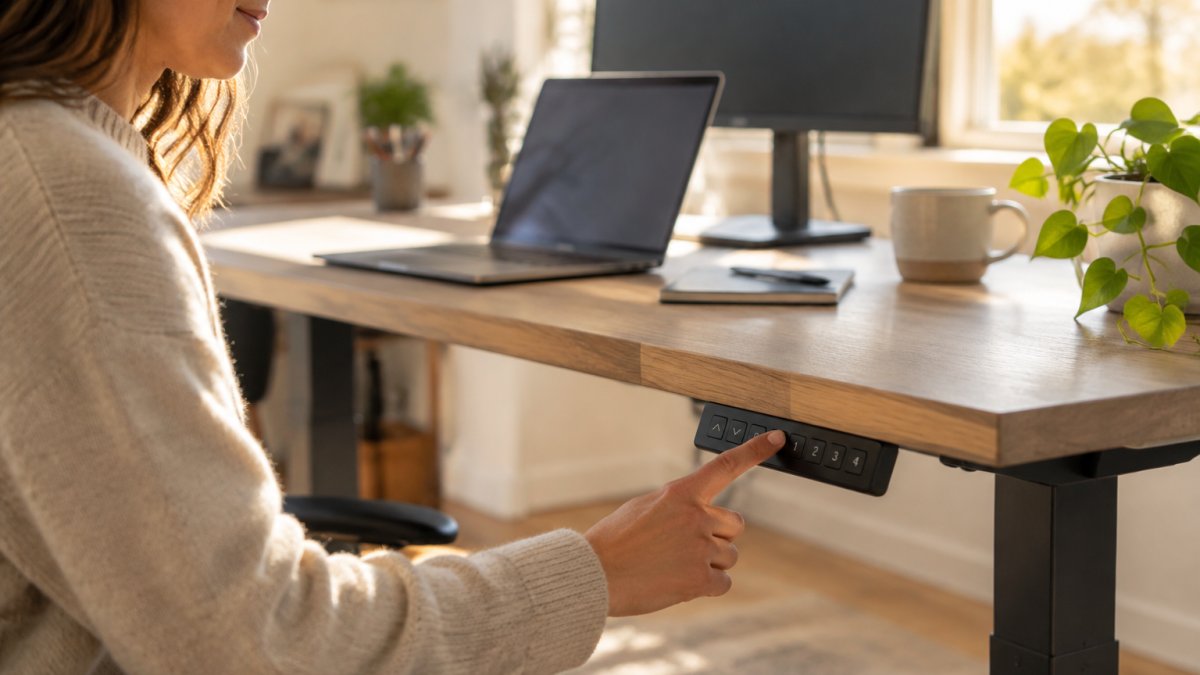
The four memory buttons on the Ergo Desks control can store seated, standing and other heights for different tasks or colleagues. The LCD version shows height in centimetres, so you can note a setting and return to it.

Standing desk frame with memory presets: what to look for
Look for a controller that stores several heights and sits where your hand naturally falls when you are seated.
Preset buttons, height display and controller placement
Button feel is worth considering. Some panels are flat and wipe-clean, while raised buttons can be easier to find without looking.
Placement affects how often you use the presets. A controller that stays within easy reach from both sitting and standing positions is the most practical. Cables should route away from the moving column so nothing snags as the desk rises.
Watch out: a controller mounted too far back means leaning under the desktop to change height, which defeats the point of an ergonomic setup.
Electric desk frame dual motor vs single motor
A dual motor frame drives each leg with its own motor, so the desk rises evenly and handles heavier loads; a single motor frame drives both legs from one motor through a connecting rod. For a desk carrying dual monitors and a desktop PC, dual motor is the safer choice.
The difference shows up in four places: lifting capacity, stability at full height, noise under load, and how hard the motor works over years of use. A single motor working harder to lift a heavy desktop tends to sound strained and can labour on the way up. Two motors share the work, which is why most frames rated for serious office use are dual motor.
Speed and noise. Dual motor frames can travel faster and run quietly under load, depending on the model. A single motor frame may be fine with a light desktop and one monitor, but add a second screen, a dock and speakers and you will hear the difference.
Load sharing and wear. With a single motor, the connecting rod transfers effort from one leg to the other. Over time, that rod and its couplings take the strain, and an unevenly loaded desktop can make the frame work harder on one side. Dual motor frames divide the load between two independent drives.
Stability at height. Two motors can help the columns extend evenly, which is generally a benefit of dual motor designs.
When single motor makes sense. If your setup is light, a laptop, one monitor and a slim desktop, and you change height once or twice a day, a single motor frame can be perfectly adequate. The trade-off is headroom: you have less capacity in reserve, and the frame will sound more strained as you approach its limit.
What to check on the specification. Look for the lifting capacity per motor rather than a single headline figure, the travel speed in millimetres per second, and the noise rating in decibels. A dual motor frame rated to 120kg, such as the Atlas, is a sensible benchmark for a home office.
When comparing frames, check the stated lifting capacity rather than the motor count alone.
The Atlas Electric Desk Frame uses a dual motor system rated to lift up to 120kg, with overload protection, thermal protection and anti-collision detection, and its motor noise is under 42dB. For a deeper comparison of the two configurations, read dual motor vs single motor desk frames before committing.
Desk frame weight capacity and stability at standing height
Match the frame's lifting capacity to everything that will sit on the desk, not just the monitor. A desktop, two screens on arms, a laptop dock, speakers and a plant add up faster than most people estimate.
Stability at standing height is where budget frames give themselves away. A well-built steel frame stays planted when the desk is raised; a lighter frame picks up a slight side-to-side sway when you type. Check whether the frame has a cross beam or telescopic centre section, and whether the feet are wide enough to spread the load.
The Atlas Corner Standing Desk Frame uses a triple motor system rated to 160kg and a highly stable solid steel frame, which suits a corner setup. If capacity is your main concern, the guide on how much weight a standing desk can hold breaks down realistic loads.
Frame-only buying: checking desktop compatibility
A frame-only purchase means you supply the desktop, so measure before you order. A desktop that is the wrong width, too thin, or drilled in the wrong place is a common cause of problems. The checks below take about ten minutes and save a lot of hassle.
Width and depth. Every adjustable frame specifies a desktop width range. The Hades Electric Frame, for example, uses a telescopic central beam that fits desktops from 1200mm to 1800mm wide. Outside that range, the frame will not sit correctly however carefully you drill: too narrow and the feet overhang the edges, too wide and the beam cannot extend far enough to support the corners.
Mounting-point spacing. Frames mount to the desktop through plates or brackets on top of each leg. Measure the distance between the mounting holes on the frame and compare it with where you can safely drill in your desktop. You want the fixings to land in solid material, not in a hollow core or close to the edge.
Thickness and construction. A very thin top can flex under the mounting plates, especially if it is wide. Solid wood, birch ply and dense chipboard generally take fixings well; honeycomb cardboard cores do not. If you are unsure what your desktop is made of, check the underside or ask the supplier.
Weight. Add up the desktop and everything that will sit on it, then compare that with the frame's lifting capacity. A large solid desktop can weigh a considerable amount on its own, which uses up part of the frame's capacity before you add monitors and a PC.
Overhang. The desktop should overhang the frame slightly at the front for comfort, but not so much that the front edge flexes. A 20-30mm overhang at the front and sides is typical; much more and you may feel the desktop give when you lean on it.
What to do if your desktop falls outside the range. If your top is narrower than the frame's minimum, the frame is the wrong choice, do not try to make it fit. If it is wider than the maximum, check whether the manufacturer offers an extension beam or a wider frame variant.
Watch out: pre-drilled desktops sold for a specific frame may not fit a different brand, the hole spacing is rarely standard, so measure rather than assume.
The step-by-step guide to checking desk frame dimensions for a desktop walks through the measurements in order.
Electric desk frame assembly and everyday safety
Assembly is often easier with two people, as the legs and centre beam can be heavy. Lay the parts out and follow the manual's order.
Everyday safety comes down to a few habits:
- Keep the travel path clear so anti-collision detection is not triggered by a chair or cable
- Leave slack in power and monitor cables so they do not pull tight at full height
- Check bolts after the first week, then every few months
- Keep children away from the controller; preset buttons are tempting to press
Power-loss behaviour is worth checking before purchase, so ask the supplier how stored presets are handled. For a realistic picture of the build, read standing desk assembly difficulty.
Choosing your electric desk frame from Ergo Desks
The right frame comes down to load, space and how often you will change height. The Atlas is a dual motor frame priced at £550.00, the Hades offers a dual motor option with a steel finish and a 1200-1800mm desktop range at £550.00, and the Crown's four-legged frame at £1,110.00 is suited to meeting tables and management desks.
The 4 Button Standing Desk Memory Control is free with all electric desks, and a replacement unit costs £50.00 if you ever need one. The frames featured here carry a 7 year warranty on the frame and electronics, with free UK delivery and returns.
| Frame | Motors | Capacity | Price | Best for |
|---|---|---|---|---|
| Atlas Electric Desk Frame | Dual | 120kg | £550.00 | Most home and office desks |
| Hades Electric Frame | Dual | Not stated | £550.00 | Custom desktops, industrial finish |
| Atlas Corner Standing Desk Frame | Triple | 160kg | £810.00 | Corner setups, multiple screens |
| Crown Electric Desk Frame | Dual | 100kg | £1,110.00 | Management desks, meeting tables |
Price
Choosing a frame is really a decision about how you want to work for the next several years. Ergo Desks builds height-adjustable frames with dual and triple motor systems, memory presets as standard, anti-collision detection and a 7 year warranty, all with free delivery and returns. Get started with Ergo Desks and build a desk that moves with you, or talk to the friendly team about which frame suits your space.
Frequently Asked Questions
What does a memory controller do on an electric desk frame?
A memory controller lets you save specific height settings and return to them with one touch. Instead of holding a button and judging the height by eye, you press a preset and the frame moves to that stored position. On the Ergo Desks 4 button memory control, you can store your preferred sitting and standing heights and switch between them with one touch. The LCD version shows height in centimetres.
Are dual-motor electric desk frames better than single-motor frames?
Dual-motor frames drive both legs independently. The Atlas Electric Desk Frame uses a dual-motor system rated to lift up to 120kg, while the Atlas Corner Standing Desk Frame uses a triple-motor system rated to 160kg. Single-motor frames can suit lighter setups, while dual-motor frames are often chosen for heavier desktops.
How do I check my existing desktop fits a frame-only desk?
Measure your desktop's width, depth and thickness, then check the frame's stated range. The Hades Electric Frame has a telescopic central beam that fits desktops from 1200 to 1800mm wide. Also confirm the desktop has enough flat underside for the mounting points and that its material holds screws securely. If your desktop falls outside the stated range or is hollow, a complete desk is the safer route.
Is electric desk frame assembly difficult?
Assembly typically involves attaching the legs, fitting the central beam and connecting the controller. Two people make it easier to flip the frame and align the desktop. Ergo Desks offers assembly as part of its tailored corporate solutions. Keep the controller cable clear of moving parts during assembly and test the full height range before loading the desk.

