


Table of Contents
- Start With Your Chair: The Foundation for Correct Sitting Posture at a Desk
- Build an Ergonomic Desk Setup Around Your Screen and Keyboard
- How to Fix Posture at a Desk When You Catch Yourself Slouching
- Desk Posture Exercises You Can Do Without Leaving Your Seat
- How Often to Take Breaks From Sitting (and What to Do in Them)
- When to Switch Between Sitting and Standing
- Common Mistakes That Undo Your Desk Posture Work
- Frequently Asked Questions
Last Updated: October 18, 2026
Start With Your Chair: The Foundation for Correct Sitting Posture at a Desk
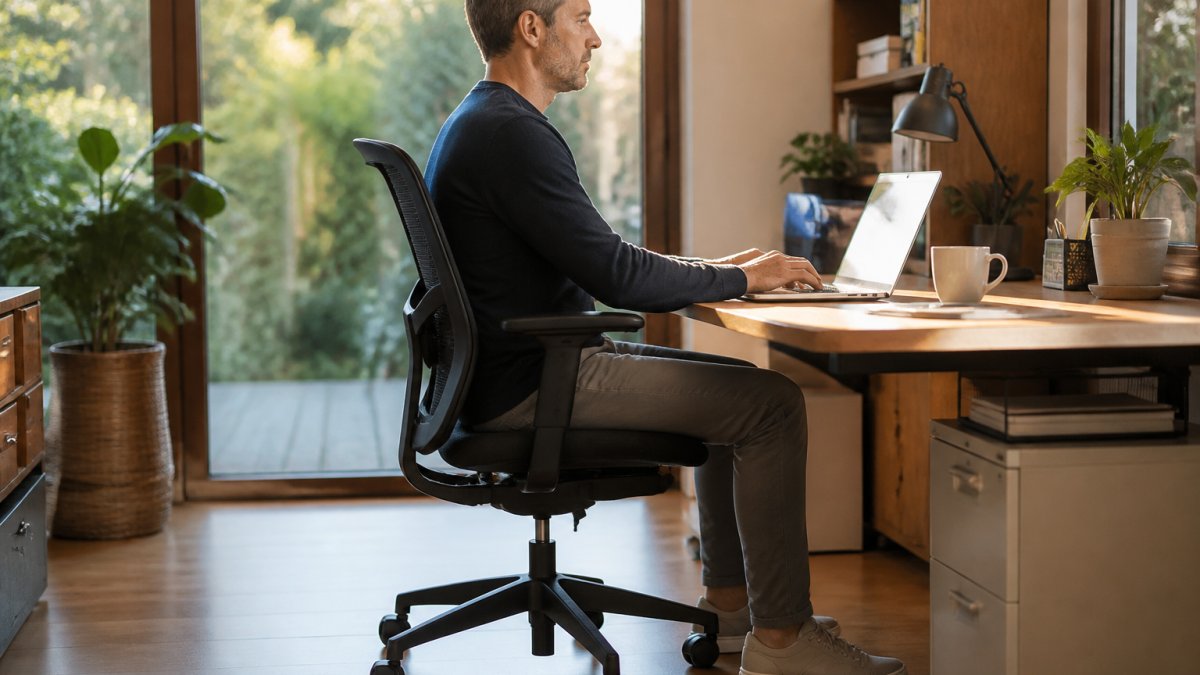
Learning how to fix posture at a desk starts with the chair, not the exercises. Correct sitting posture at a desk means feet flat, hips level with or slightly above the knees, and the lower back supported by the chair's lumbar pad. Get the chair wrong and no amount of stretching will hold the position. This guide from Ergo Desks walks through each adjustment in order.
Setting Seat Height and Depth
Raise the seat until the feet rest flat on the floor and the knees sit at roughly a right angle. If the desk is then too high, use a footrest rather than dropping the chair. For seat depth, leave a two-finger gap between the back of the knee and the seat edge.
Where Your Back, Shoulders and Feet Should Sit
The back should meet the lumbar support without slumping to reach it. Shoulders stay down and relaxed, with elbows near a right angle. Feet stay planted, never hooked round the chair legs.
Build an Ergonomic Desk Setup Around Your Screen and Keyboard
An ergonomic desk setup puts the screen and keyboard where the body already sits well. The top of the screen should sit at or just below eye level, about an arm's length away. A monitor arm makes this easy to set and keeps it fixed, such as the Monitor Arms rated for screens up to 32 inches.

Monitor Height, Distance and the Weight Capacity
The question of weight capacity is simple: how much weight is your mount holding? A single arm in this range typically holds up to 20kg, a dual arm up to 26kg. Check the screen weight before buying. The Health and Safety Executive guidance on display screen equipment sets out the DSE basics employers must follow.
How to Fix Posture at a Desk When You Catch Yourself Slouching
Slouching creeps back because the setup drifts, not because willpower fails. When you notice it, stand up for ten seconds, roll the shoulders back, then sit down again with the hips pushed to the back of the seat. Reset the chair once a week. Small, frequent corrections beat one long attempt at sitting perfectly.
Desk Posture Exercises You Can Do Without Leaving Your Seat
Desk posture exercises take under a minute each and need no equipment. Try these every hour:
- Chin tucks: pull the chin straight back, hold five seconds, repeat five times.
- Shoulder blade squeezes: draw the shoulder blades together, hold five seconds.
- Seated spinal twist: turn gently to each side and hold.
- Chest opener: clasp hands behind the back and lift slightly.
- Wrist and neck rolls: slow circles in both directions.
How Often to Take Breaks From Sitting (and What to Do in Them)
Take a short break every 30 minutes and a longer one every hour. Stand, walk to fill a glass of water, or do a few of the exercises above. The point is to change position, not to rest. Frequent small breaks matter more than one long lunchtime walk.
Torvan Ergonomic Mesh Task Chair →
When to Switch Between Sitting and Standing
Switch between sitting and standing roughly every 30 to 45 minutes. Start with short standing spells and build up over a few weeks, since calves and lower back need time to adjust. A height-adjustable desk makes the switch quick enough that people actually do it. Ergo Desks specialises in these desks, with free delivery and returns, and a seven-year warranty on its desk range. If you are unsure which model suits your space, you are welcome to talk to our friendly team about what product is best for you.
Common Mistakes That Undo Your Desk Posture Work
The most common mistake is setting the chair once and never checking it again. Others include:
- Raising the monitor by stacking books, which shifts and wobbles.
- Perching on the seat edge, which defeats the lumbar support.
- Standing all day instead of alternating.
- Ignoring laptop height, which pulls the head forward.
An NHS overview of back pain and posture is a useful starting point if discomfort persists.
For a chair that supports this setup, the Torvan Ergonomic Mesh Task Chair offers twin lumbar pads with 80mm of height adjustment and a seat depth range of 465 to 525mm.

Frequently Asked Questions
How can I fix my posture while sitting at a desk?
Start with your chair: set the seat height so your feet rest flat and your knees sit at roughly hip level, then adjust seat depth so your back stays against the backrest. Bring your screen up to eye level using a monitor arm or laptop stand, and keep your keyboard close so your elbows stay near 90 degrees. Then build the habit of resetting every 30 to 45 minutes, because good posture at a desk is mostly about frequent small corrections rather than holding one rigid position all day.
Can desk posture exercises really help improve my sitting position?
Yes, when done consistently. Desk posture exercises work by loosening the muscles that pull you into a slouch, mainly the chest and hip flexors, and waking up the ones that hold you upright, such as the upper back and glutes. Simple options include shoulder blade squeezes, seated spinal rotations, chest openers in a doorway and standing hip flexor stretches. Two or three short sessions across the working day is enough; the aim is regular movement, not a long workout.
How often should I take a break from sitting at my desk?
Aim to break up sitting roughly every 30 to 45 minutes, even if only for a minute or two. Stand up, walk to the kettle, roll your shoulders or do a quick stretch. The exact interval matters less than avoiding long unbroken blocks of sitting. Pairing breaks with a height-adjustable desk makes this easier, since you can switch to standing for part of the hour instead of staying seated until a formal break arrives.
Does a standing desk improve posture?
A standing desk helps posture mainly by making it easier to change position often, which is what desks and chairs alone cannot do. Standing for part of the day reduces the long static load on your lower back and hips, but standing all day brings its own problems. The practical approach is to alternate: sit for focused work, stand for calls or reading, and keep adjusting. A monitor arm helps here too, so the screen stays at eye level whether you are seated or standing.
