


Last Updated: October 22, 2026
Quick Summary
Standing desks support productivity by making it easy to change posture through the day, which reduces sitting time and improves comfort. The gains are modest and real rather than dramatic, and they depend on combining standing with regular movement and a good setup. Start with short standing blocks and build up gradually.
- Start with 30 to 60 minutes of standing per session and build gradually.
- A workable rhythm is sit for 30 minutes, then stand for 15 to 30.
- Set the desk so your elbows rest at roughly 90 degrees with relaxed shoulders.
- Keep supportive shoes and a floor mat nearby to prevent foot discomfort.
- Choose a stable dual-motor desk with memory presets so switching stays effortless.
Table of Contents
- Why Standing Desks Are More Than a Wellness Trend
- What the Standing Desk Productivity Research Actually Shows
- How Long to Stand at a Standing Desk for a Productive Day
- Standing Desk Ergonomics: Setting Up for Focus and Comfort
- Standing Desk Tips for Beginners: Easing Into the Routine
- Common Drawbacks and How to Avoid Them
- Choosing a Desk That Supports Productivity
- Conclusion
- Frequently Asked Questions
Why Standing Desks Are More Than a Wellness Trend
Standing desks have moved from novelty to mainstream office furniture, and the reason is straightforward: sitting for long stretches is hard on the body, and a desk that lets you change posture gives that body a break. At Ergo Desks, the team has watched this shift first-hand since 2017, and the pattern is consistent. People who can alternate between sitting and standing report fewer aches, better focus and a workday that feels less like a marathon in a chair.
That said, the productivity case deserves honest scrutiny rather than hype. A standing desk is not a magic fix, and anyone promising instant transformation is overselling. What the benefits of standing desks for productivity really come down to is movement, posture and comfort, three things that compound quietly over weeks rather than minutes.
What the Standing Desk Productivity Research Actually Shows
The honest answer is that standing desk productivity research points to modest, real gains rather than dramatic ones. Studies generally find that standing desks reduce sitting time and improve comfort, while effects on raw output are smaller and depend heavily on how people use the desk.

A common mistake is expecting a desk alone to boost output. The gains appear when standing is combined with regular movement and good setup. Think of the desk as removing a barrier, not doing the work for you. Optimising your physical environment further requires a clean desk setup to ensure that your workflow remains as fluid as your posture.
How Long to Stand at a Standing Desk for a Productive Day
Most guidance suggests starting with 30 to 60 minutes of standing per session, building gradually toward a few hours spread across the day. The key phrase is "spread across": nobody benefits from standing for four unbroken hours.
A practical rhythm many people find workable is sit for 30 minutes, stand for 15 to 30, then sit again. Use the standing blocks for tasks that suit them, such as calls, emails or reading, and save deep-focus work for whichever position feels steadiest that day.
- Start with two short standing blocks per day
- Increase by 15 minutes each week
- Never push through discomfort to hit a target
- Alternate positions before stiffness sets in
Standing Desk Ergonomics: Setting Up for Focus and Comfort
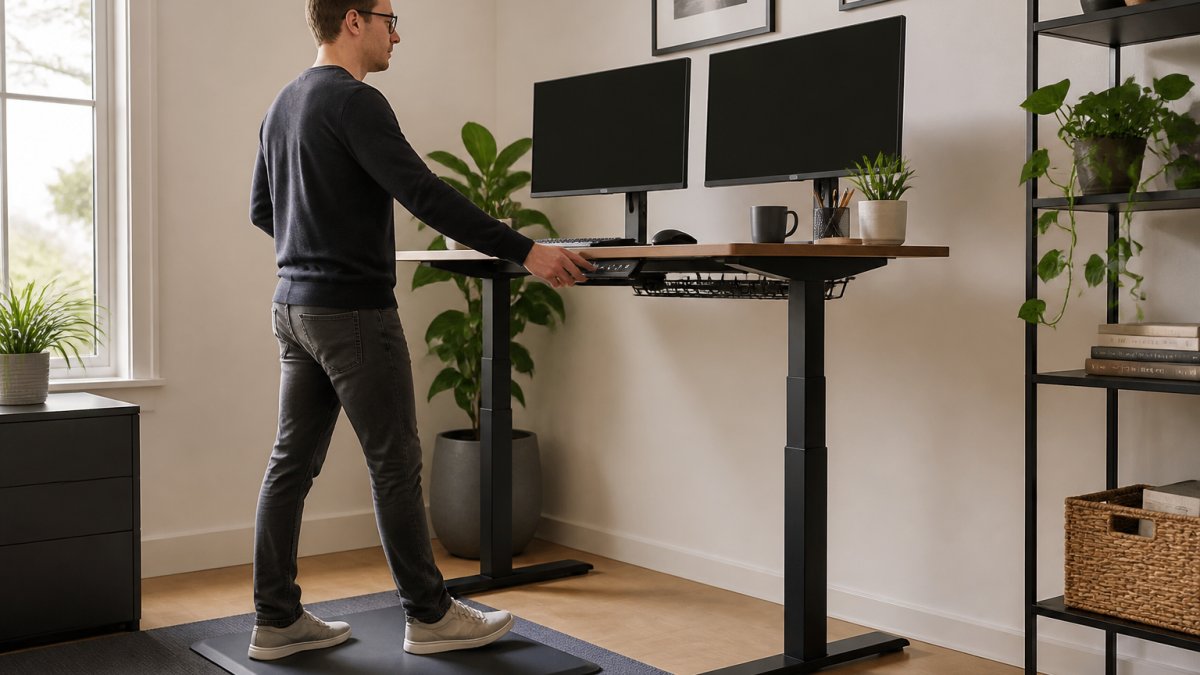
Standing desk ergonomics begins with one rule: the desk height must let your elbows rest at roughly 90 degrees with your shoulders relaxed. If you are reaching up or hunching down, the desk is at the wrong height.
For standing, the top of the monitor should sit around eye level, and your wrists should stay flat rather than angled. A floor mat makes a genuine difference here, and the Standing Desk Floor Mat is designed to relieve pressure on the feet, legs and spine while encouraging better circulation. The 4 Button Standing Desk Memory Control removes the guesswork entirely by storing your preferred sitting and standing heights, so switching takes a button press rather than a fumble.

Standing Desk Tips for Beginners: Easing Into the Routine
The best standing desk tips for beginners all share one theme: patience. Jumping straight into hours of standing is the fastest route to sore feet and a desk you quietly stop using.
Build the habit slowly and pair it with cues you already have. Stand during phone calls, for instance, or during the first 20 minutes after lunch. These small anchors make the change stick without willpower.
Common Drawbacks and How to Avoid Them
The main drawbacks are fatigue, foot discomfort and the temptation to stand too long, and each has a simple counter. Fatigue fades as your body adapts, provided you build up gradually. Foot discomfort is largely solved by a mat and sensible footwear. Overstanding is solved by a timer or a simple rule: sit the moment you notice tension.
Posture drift is the sneaky one. People stand well for a week, then start leaning on one hip. A mirror or a periodic self-check keeps it in line.
Choosing a Desk That Supports Productivity
A desk that wobbles, jams or takes an age to adjust will quietly kill the habit, so stability and smooth adjustment matter more than any marketing claim. The Atlas Standing Desk uses a dual-motor system to lift up to 120kg on a heavy-duty frame, which keeps dual monitors steady at any height. For tighter rooms, the Atlas Mini Sit Stand Desk offers the same 120kg capacity and dual-motor performance in a compact frame. Both come with a 7-year warranty and free delivery, and if you are unsure which model suits your space, you can talk to our friendly team about which product is best for you.

| Consideration | What to Look For | Why It Matters |
|---|---|---|
| Stability | Heavy-duty frame, dual motors | Prevents wobble with monitors |
| Adjustment | Memory presets | Makes switching effortless |
| Space | Compact frame option | Fits smaller home offices |
| Support | Long warranty | Confidence in daily use |
Conclusion
Building a standing habit takes a few weeks of patience, a desk that adjusts smoothly and a willingness to sit back down when your body asks. Ergo Desks supplies height-adjustable desks with dual-motor stability, a 7-year warranty and free delivery, plus the mats and memory controls that make the switch easy. Get started with Ergo Desks and build a workspace that moves with you.
Frequently Asked Questions
Do standing desks really improve productivity?
Research suggests they can help. Studies on standing desk productivity research link more standing and less prolonged sitting with better focus, reduced afternoon fatigue and improved task engagement, largely because movement supports circulation and alertness. The gains come from alternating positions regularly rather than standing all day. Pairing a height-adjustable desk with good standing desk ergonomics gives you the best chance of seeing a difference in your working day.
How long should you stand at a standing desk each day?
Start with 20 to 30 minutes of standing for every hour or two of sitting, then build up gradually. Most people find a rhythm of 30 to 60 minutes standing followed by sitting works well. The key is to change position before discomfort sets in. If you are new to it, follow standing desk tips for beginners and increase your standing time by a few minutes each week rather than jumping straight into a full day on your feet.
Is it better to sit or stand while working?
Neither position should be held for hours. Standing for long stretches can cause its own discomfort in the feet, legs and lower back, just as prolonged sitting can. The most productive approach is to alternate between sitting and standing throughout the day, using a height-adjustable desk to switch positions easily. A standing desk floor mat can make longer standing periods more comfortable and support better posture.
What are the drawbacks of using a standing desk?
Common drawbacks include fatigue in the feet and legs, pressure on the lower back if you stand too long without moving, and the temptation to slouch when the desk is set at the wrong height. These are manageable by alternating positions, wearing supportive footwear, using an anti-fatigue mat and setting your desk to the correct standing desk ergonomics. Building up gradually with standing desk tips for beginners helps you avoid soreness in the first few weeks.
