


Last Updated: October 23, 2026
Quick Summary
How to measure for a standing desk starts by standing naturally with your arms at your sides, bending your elbows to 90 degrees, and measuring from the floor to the inside of your elbow crease. This measurement is your ideal desk surface height. You should also measure your seated position and arm reach to ensure comfort in both postures.
- Measure elbow height whilst wearing the shoes you'll typically wear at your desk, as heel height changes measurements by 2-3 centimetres
- Your seated surface height plus 20-30 centimetres determines your desk height when sitting
- Most standing desks adjust between 71 and 121 centimetres to accommodate different user types
- Measure multiple times across different days to spot patterns and ensure accurate adjustments
- Monitor position matters as much as desk height to prevent neck strain when seated and standing
Table of Contents
- Why Measuring Correctly Matters for Your Standing Desk
- How to Measure Elbow Height for a Standing Desk
- How to Measure for a Standing Desk: The Complete Process
- Using a Standing Desk Height Calculator
- What Size Standing Desk Do I Need?
- Standing Desk Converter Measurements and Setup
- Common Measurement Mistakes to Avoid
- Frequently Asked Questions
Why Measuring Correctly Matters for Your Standing Desk
Getting the right standing desk height makes all the difference between comfort and pain. Incorrect measurements lead to poor posture, neck strain, and wrist discomfort. A desk that's too high or too low forces your body into unnatural positions throughout the day.

How to measure for a standing desk starts with understanding your own body dimensions. Everyone's proportions differ slightly. What works for one person may cause problems for another. That's why personalised measurement is essential.
The stakes are high. A poorly fitted desk undermines the whole point of standing work. You end up slouching, reaching awkwardly, or hunching over your keyboard. None of that builds a healthier workspace.
Taking 10 minutes to measure properly saves months of discomfort and wasted money on equipment that doesn't fit.
How to Measure Elbow Height for a Standing Desk
Elbow height is the single most important measurement for standing desk setup. This determines where your keyboard and mouse should sit relative to your body.

Here's the process:
- Stand naturally with your arms at your sides
- Bend your elbows to 90 degrees
- Measure from the floor to the inside of your elbow crease
- This measurement is your ideal desk surface height
The reason elbow height matters is straightforward. When your elbows rest at 90 degrees, your shoulders stay relaxed. Your wrists stay neutral. Your forearms don't have to reach up or down. This position reduces strain on your shoulders, neck, and wrists.
Most people make the mistake of measuring from their wrist instead of their elbow. Don't do that. Your wrist height is several centimetres lower than your elbow. Using wrist height creates a desk that's too low, forcing you to hunch forward.
How to Measure for a Standing Desk: The Complete Process
Measuring for a standing desk involves four key steps. Take your time with each one. Accuracy here prevents costly mistakes later.
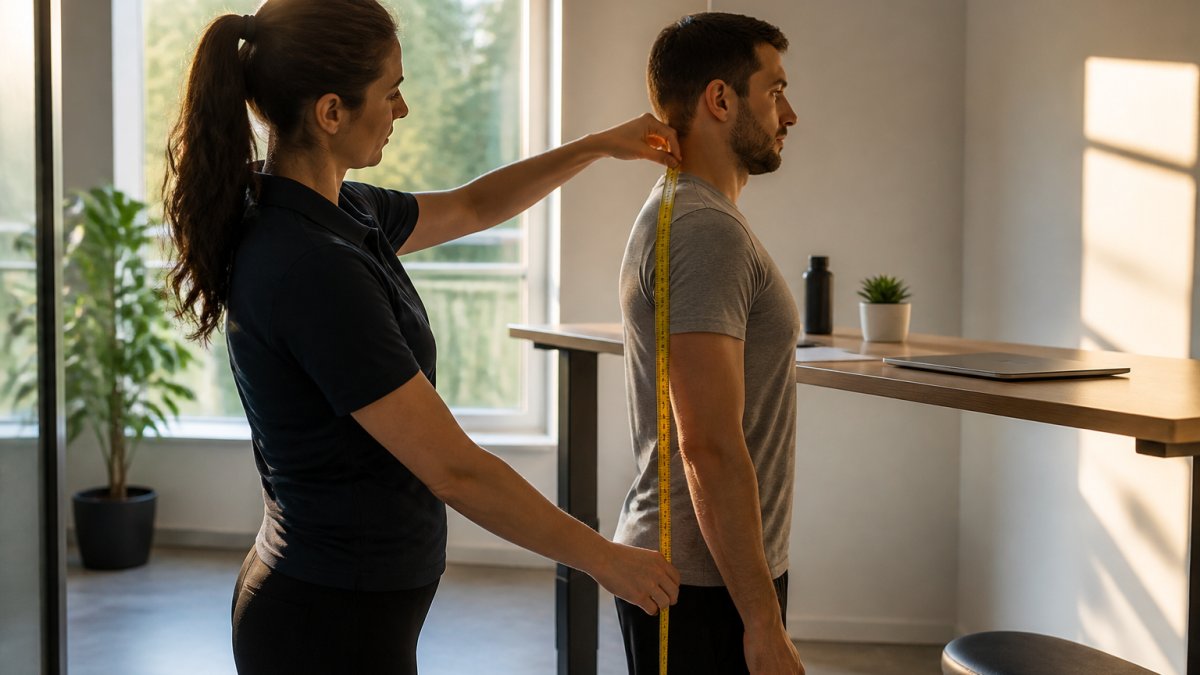
Step 1: Measure Your Height and Reach
Start with your total height. Stand barefoot against a wall and measure from floor to the top of your head. Write this down.
Next, measure your arm reach. Stand with one arm extended straight out to the side at shoulder height. Measure from your fingertips to the wall. This tells you how far your monitors and equipment can sit from your body.
Arm reach matters because it determines your desk depth. A shallow desk forces equipment too close. A deep desk lets you position monitors at a comfortable distance. Most people need 60-75 centimetres of depth to position dual monitors properly.
Step 2: Determine Your Ideal Seated Position
Sit in the chair you'll use at your desk. Measure from the floor to the underside of your thighs. This is your seated surface height.
Now measure from the seated surface to your elbow. This should be 20-30 centimetres. Your desk height when sitting should match your elbow measurement plus this gap.
Many people skip this step and just focus on standing height. That's a mistake. Your seated position matters just as much. A desk that works for standing but not sitting defeats the purpose of a height-adjustable desk.
Step 3: Calculate Your Standing Desk Height
Take your elbow height measurement from earlier. This is your target standing desk height.
For seated work, add 20-30 centimetres to your seated surface height. This gives you the desk height needed when sitting.
Most standing desks range from 71 to 121 centimetres in height adjustment. The Uno Standing Desk, for example, adjusts from 72.5 to 120.5 centimetres, which covers most user types comfortably.
Write down both numbers: your standing height and your seated height. Your desk should move smoothly between these two positions.
Using a Standing Desk Height Calculator
A standing desk height calculator removes guesswork from the process. Input your height, and the calculator suggests an ideal range. This gives you a starting point before fine-tuning based on your actual measurements.
Most calculators use a simple formula: multiply your height by 0.62 to 0.65. This generates a rough estimate. However, this formula works as a general guide only. Individual proportions vary too much for a formula to be perfect.
The best approach combines calculator results with your own measurements. Use the calculator to get a ballpark figure. Then verify using your elbow height measurement. If they're close, you're on track. If they differ significantly, trust your personal measurements over the calculator.
What Size Standing Desk Do I Need?
Desk size depends on three factors: your equipment, your workspace, and your work style.
Equipment load matters first. Count everything that sits on your desk: monitors, keyboard, mouse, documents, personal items. Estimate the total weight. Most standing desks handle 80-120 kilograms easily. The Remo Standing Desk supports up to 80 kilograms with built-in anti-collision technology. The Atlas Standing Desk lifts up to 120 kilograms.
Workspace dimensions come next. Measure the space where your desk will go. A compact home office might only fit a 120-centimetre wide desk. A corporate office might accommodate 180 centimetres or more. The Atlas Standing Corner Desk offers 160 kilograms capacity for L-shaped setups, maximising office footprint.
Work style shapes the final choice. Someone working with paper documents needs more surface area than someone using only digital tools. A designer with multiple monitors needs different dimensions than a writer. Think about what actually lives on your desk during a typical day.
| Desk Size | Best For | Typical Width |
|---|---|---|
| Compact | Single monitor, limited space | 100-120cm |
| Standard | Dual monitors, typical office | 140-160cm |
| Large | Triple monitors, extensive equipment | 180-200cm |
| Corner/L-shaped | Maximum workspace, power users | 160-200cm per side |
Standing Desk Converter Measurements and Setup
A standing desk converter sits on top of an existing desk. It raises your monitor and keyboard to standing height without replacing your whole desk. This works well for renters or people with limited budgets.
Converters typically adjust from 10 to 50 centimetres in height. Measure the height of your current desk first. Add the converter's maximum rise to this number. The result should reach your elbow height when standing.
Check the converter's weight capacity against your equipment. Most converters handle 15-25 kilograms. That's enough for a monitor and keyboard, but not for multiple large screens.
Converters also require more desk surface area underneath them. You lose workspace because the converter takes up room. If your desk is already crowded, a full standing desk might serve you better than a converter.
Common Measurement Mistakes to Avoid
Measuring in the wrong shoes is mistake number one. Heels, flat shoes, and trainers all change your measurements. Measure in the footwear you'll actually wear at your desk.
Ignoring your seated position is mistake number two. Many people focus only on standing height and ignore how the desk works for sitting. You spend roughly half your time seated. That position deserves equal attention.
Using an uncomfortable chair skews everything. If your chair is too high or too low, your measurements won't help. Get your chair right first. Then measure your desk.
Not accounting for monitor position causes problems. Your desk height is just one part of the puzzle. Monitors should sit at eye level when seated and slightly below eye level when standing (Working safely with display screen equipment). If your desk height is perfect but your monitor is too low, you'll still strain your neck.
Measuring only once leads to regret. Measure multiple times across different days. Your posture and comfort preferences might shift slightly. Multiple measurements help you spot patterns and adjust accordingly.
Proper measurement prevents months of discomfort and wasted investment in equipment that doesn't suit your body. The process takes just 15 minutes but delivers years of comfort and better posture. If you're unsure about your measurements or want guidance tailored to your specific needs, talk to our friendly team about what product is best for you. We're here to help you find the standing desk that truly fits your workspace and body.
Frequently Asked Questions
How do I measure the correct height for a standing desk?
Stand with your arms at your sides and measure the distance from the floor to your bent elbow (approximately 90 degrees). This measurement is your ideal desk height when standing. Sit down and repeat the process, your seated desk height should be slightly lower, typically 10-15cm below your standing height. Most standing desks adjust between 70-120cm to accommodate both positions. If you're between sizes, choose the desk that allows you to maintain a neutral wrist and elbow position in both sitting and standing modes.
What size standing desk do I need for my space?
Measure your available floor space and subtract 30cm for clearance on each side. For single-monitor setups, a desk 100-120cm wide is sufficient. Dual monitors typically require 120-150cm. Depth should be at least 60cm to accommodate your monitor at arm's length. If space is limited, consider compact models like the Uno Standing Desk (£290.00), which is designed for smaller offices. Corner desks like the Atlas Standing Corner Desk (£955.00) maximise footprint in L-shaped configurations.
How do I know if my standing desk is set up ergonomically?
Check three key points: your elbows should bend at 90 degrees with arms relaxed at your sides, your screen should be at eye level when you're standing, and your wrists should remain neutral (not bent up or down) when typing. Your monitor should be 50-70cm away. Adjust your desk height if your shoulders hunch or your wrists bend. Most users benefit from switching between sitting and standing every 30-60 minutes to reduce fatigue and improve circulation.
Can I use a standing desk converter if I already have a desk?
Yes. Measure your existing desk height first, most are 70-75cm. A converter sits on top, so add its height range to your desk height to find your total working height. Converters typically raise your workspace by 10-20cm. Ensure your existing desk is sturdy enough to support the converter and your equipment (check load capacity). Measure your monitor and keyboard placement on the converter to ensure proper ergonomic positioning before purchasing.

