


Last Updated: November 2, 2026
Quick Summary
The best electric desk frames for existing desktops are the Atlas Electric Desk Frame for most standard tops and the Hades Electric Frame for desktops 1200 to 1800mm wide. Both are dual motor frames priced at £550.00, and each carries a 7-year warranty.
- Check your desktop width against the frame's stated range before ordering anything.
- The Atlas lifts up to 120kg with motor noise below 42dB.
- The Hades runs at 40mm/s and suits desktops from 1200 to 1800mm.
- The Atlas Corner Standing Desk Frame uses a triple motor system rated to 160kg.
- Route cables through an underside tray before mounting the top.
Table of Contents
- Why Reuse Your Desktop With an Electric Desk Frame
- Quick Comparison: Electric Desk Frames for Existing Desktops
- 1. Atlas Electric Desk Frame: Best All-Round Dual Motor Frame
- 2. Hades Electric Frame: Best for Wider Desktops
- 3. Atlas Corner Standing Desk Frame: Best Triple Motor Corner Frame
- 4. Hades Electric Corner Frame: Best Heavy-Duty Corner Frame
- 5. Crown Electric Desk Frame: Best Four-Legged Frame for Meeting Spaces
- Choosing a Standing Desk Frame for an Existing Tabletop
- Frequently Asked Questions
Why Reuse Your Desktop With an Electric Desk Frame
Electric desk frames are the motorised bases that turn a tabletop you already own into a height-adjustable standing desk. Buying the frame alone costs less than a complete desk, keeps a surface you already like, and lets you choose the exact size and finish that fits your room. This guide from Ergo Desks compares five frames that accept existing desktops, so you can match motor count, lift capacity and footprint to the top you already have.
The appeal is straightforward. Most people replace a whole desk when only the base has failed, or when they want sit-stand movement without losing a solid oak or bespoke top. A frame swap solves both problems at once.
There is a catch worth knowing early. Frames are sold to suit a range of desktop widths, and a top that falls outside that range will not fit without modification. Check the width range before anything else.
Quick Comparison: Electric Desk Frames for Existing Desktops
The table below summarises the five frames covered in this guide, so you can shortlist before reading the detail.
| Frame | Price | Motors | Lifting Capacity | Best For |
|---|---|---|---|---|
| Atlas Electric Desk Frame | £550.00 | Dual | 120kg | Most home and office desktops |
| Hades Electric Frame | £550.00 | Dual | Not stated | Desktops 1200-1800mm wide |
| Atlas Corner Standing Desk Frame | £810.00 | Triple | 160kg | Corner desktops and desk pods |
| Hades Electric Corner Frame | £810.00 | Triple | 160kg | Heavy corner setups |
| Crown Electric Desk Frame | £1,110.00 | Dual | 100kg | Meeting tables and management desks |
1. Atlas Electric Desk Frame: Best All-Round Dual Motor Frame
The Atlas is the frame to start with if you have a standard rectangular top and no unusual requirements. A dual motor system lifts up to 120kg, with overload protection, thermal protection and anti-collision detection built in. Motor noise stays below 42dB, which is quiet enough to sit in a shared office without drawing attention.
Designed in Scandinavia and manufactured in the UK, the Atlas carries a 7-year warranty. The 120kg rating gives generous lifting capacity for a desktop plus equipment.
Pros: Quiet operation, generous capacity, strong warranty, keen price for a dual motor frame. Cons: Not intended for corner tops or very wide desktops. Best for: Home offices and standard office desks where a reliable dual motor frame is the priority. Skip if: Your desktop is an L-shape or wider than a standard rectangular top.
Readers who want the full specification can view the Atlas electric desk frame and order it directly.

2. Hades Electric Frame: Best for Wider Desktops
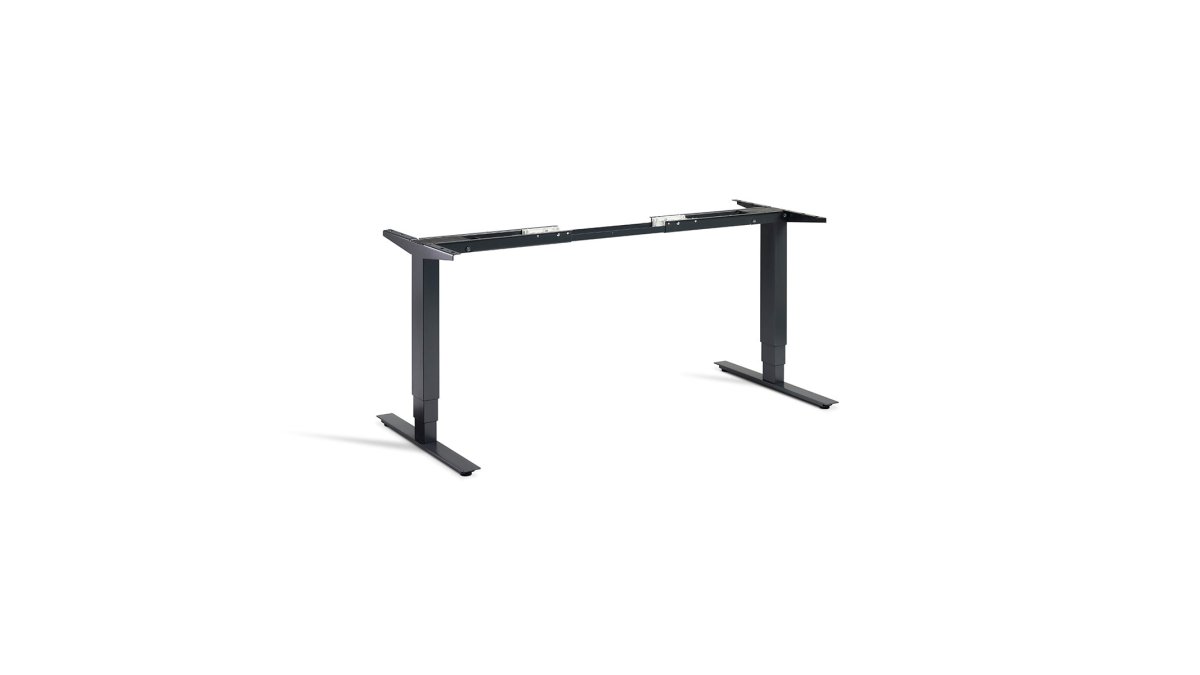
Width is where the Hades earns its place. A telescopic central beam adjusts to suit desktops from 1200 to 1800mm, which makes it the frame to choose when you have a long top and want the legs positioned sensibly rather than pinned to one fixed span.
The build is high grade steel finished in clear matt lacquer, leaving visible weld seams and heat marks for an industrial look. Two Logic Data motors run at 40mm/s. The frame and electronics are covered by a 7-year guarantee.
Pros: Adjustable width range, fast 40mm/s travel, distinctive raw steel finish. Cons: The visible weld marks are a design choice, not a flaw, but they will not suit every interior. Best for: Long rectangular desktops between 1200mm and 1800mm. Skip if: You want a painted, uniform finish.
Full specifications and ordering are available on the Hades electric frame product page.

3. Atlas Corner Standing Desk Frame: Best Triple Motor Corner Frame
Corner desktops need a third leg, and the Atlas corner frame supplies one. A triple motor system lifts up to 160kg with overload protection, thermal protection and anti-collision detection, and the solid steel frame is built for constant daily adjustment. Such robust engineering provides the necessary foundation for a clean minimalist desk setup that keeps your workspace free from unnecessary clutter.
The Atlas corner frame has sub-42dB motor noise and an energy-efficient automatic standby mode. It suits a spacious corner office or a pod of several desks.
Pros: 160kg capacity, quiet motors, standby mode, free delivery to mainland UK. Cons: The shorter warranty period compared with the standard Atlas frame is worth weighing up. Best for: Corner offices, home studies in an alcove, and grouped desk pods. Skip if: Your top is rectangular; a corner frame will not fit it.
The Atlas corner standing desk frame page lists the full technical details.
4. Hades Electric Corner Frame: Best Heavy-Duty Corner Frame
Where the Atlas corner frame prioritises quiet refinement, the Hades corner frame leans into raw strength. This triple motor frame carries an even load of 160kg and offers a height range of 625 to 1285mm, which accommodates a broad spread of user heights.
The finish matches the standard Hades: clear lacquer over raw steel, with weld seams and burnishing left visible. Precision manufacturing keeps operation smooth despite the rugged appearance. An operational high sensitivity upgrade is available for users who need finer collision response.
Pros: Wide height range, 160kg even load, high sensitivity upgrade option. Cons: The industrial finish divides opinion in client-facing spaces. Best for: Heavy corner setups with large monitors or specialist equipment. Skip if: You need a painted frame to match existing furniture.
Specifications and ordering sit on the Hades electric corner frame page.

5. Crown Electric Desk Frame: Best Four-Legged Frame for Meeting Spaces
Four legs change how a desk reads in a room. The Crown uses a dual motor to drive a four-legged frame rated to 100kg, and the result looks substantial enough for a management office or a meeting table in a collaborative workspace.
Overload protection, thermal protection and anti-collision detection are all included, backed by a 7 year warranty. The trade-off is capacity: at 100kg it carries less than the corner frames, though that is ample for a tabletop and typical meeting-room equipment.
Pros: Stable four-legged stance, strong warranty, suits meeting and management settings. Cons: Lower lifting capacity than the corner frames at a higher price. Best for: Meeting tables and senior offices where presence matters. Skip if: You need maximum lifting capacity for heavy equipment.
The Crown electric desk frame page covers the full specification.
Choosing a Standing Desk Frame for an Existing Tabletop
Matching a frame to a top comes down to four checks: width, weight, thickness and cable routing. Get these right before ordering and the swap takes an afternoon.
Standing desk frame weight capacity is the first number to confirm. Add the weight of your desktop to everything that sits on it, then leave headroom. A solid timber top can be surprisingly heavy, and the frame rating should exceed your total by a comfortable margin.
How to attach a desktop to a standing desk frame follows a consistent pattern:
- Confirm the desktop width falls inside the frame's stated range
- Check the top's thickness against the frame's mounting brackets
- Measure and mark the fixing points using the frame's template
- Pre-drill pilot holes to avoid splitting the timber
- Fit the brackets with the supplied fixings, checking torque as you go
- Mount the top with two people, then test the full height range before loading it
Standing desk cable management deserves attention before the top goes on. Route cables through a tray or channel fixed to the underside while the desk is upside down, and leave slack for the full travel of the height range. Cables that are too short will pull tight at standing height, which is the most common installation mistake.
A common mistake is ordering a frame for a top that sits right at the edge of the width range. Leave a little margin so the legs sit well inboard from the desktop edges.
For help matching a frame to a specific top, talk to our friendly team about the best product for your setup.
Frequently Asked Questions
Can you put an existing desktop on an electric desk frame?
Yes, provided the desktop's width and depth fit the frame's adjustment range and the combined weight stays within the frame's rated capacity. Check the width range of the specific model before ordering, and confirm the top's weight against the frame's rated capacity.
How do I choose the right electric desk frame for my desktop?
Start with three measurements: your desktop's width, depth and weight. Match the width to the frame's telescopic range, then subtract the desktop weight from the frame's lifting capacity to see what payload remains for monitors and equipment. Next, decide between dual and triple motors based on how often the desk will move and how much load it carries. Finally, check the height range suits your seated and standing positions, and confirm the warranty covers the electronics.
Are electric desk frames stable at standing height?
Keep heavier items towards the centre of the desktop, and tighten all fixings during assembly.
How much weight can an electric desk frame support?
Capacity varies by model: the Atlas and Hades frames lift up to 120kg, the Atlas Corner and Hades Corner frames handle 160kg, and the Crown frame supports up to 100kg. Remember that this figure includes your desktop. Subtract your desktop's weight from the rated capacity to see the remaining headroom for equipment. Always leave a margin below the maximum rather than loading to the limit.
Do electric desk frames come with cable management?
Plan your cable route before assembly, and leave enough slack for the desk to travel through its full height range. Good cable management protects the motors and keeps the desk looking tidy in shared offices.
Matching a frame to a desktop you already own takes a little measuring, but it saves the cost and waste of replacing a good top. Ergo Desks supplies height-adjustable frames with a 7 year warranty on most models, free delivery to mainland UK, and a full range of ergonomic accessories to complete the setup. Get started with Ergo Desks and build a standing desk around the desktop you already have.

